
Weighted PLS Algorithm (WPLS)
The weighted PLS algorithm (WPLS), introduced by Becker and Ismail (2016), is a modified version of the standard PLS path modeling algorithm that incorporates sampling weights into the estimation. Researchers use WPLS when their sample does not perfectly represent the population it was drawn from — for example, because of unequal selection probabilities, unit nonresponse, or noncoverage — and an appropriate sampling weight variable is available to correct for this. Applying WPLS instead of the standard PLS-SEM algorithm produces, on average, more accurate population parameter estimates.
Why Sampling Weights Matter in PLS-SEM
Applications of PLS-SEM usually focus on survey responses in management, social science, and market research, with researchers using their collected samples to estimate population parameters. For this purpose, the sample must represent the population. However, population members are often not equally likely to be included in the sample, meaning that sampling units have different probabilities of being selected. Sampling (post-stratification) weights should therefore be used to obtain consistent estimates when estimating population parameters. Applying appropriate weights — for example, through weighted means or weighted variances — can correct not only for imperfections caused by unequal selection probabilities, but also for imperfections caused by unit nonresponse and noncoverage.
How WPLS Works
PLS-SEM is a system of regressions on standardized indicator data, and it calculates weighted composites as an approximation of the conceptual latent variables in an iterative algorithm. A suitable approach to incorporating sample weighting into PLS-SEM builds on the data of the observed (or manifest) variables and a weighting variable that corrects for the unequal probability of selection, thereby ensuring the sample's representativeness with regard to the population. The weighted PLS algorithm (WPLS), as presented by Becker and Ismail (2016), incorporates these weights using weighted correlations and weighted regression results when estimating the PLS path model. WPLS is a modified version of the original PLS path modeling algorithm that incorporates sampling weights. As a result, WPLS provides better average population model parameter estimates than the basic PLS algorithm when appropriate sampling weights are available (Becker and Ismail, 2016; Cheah et al., 2021).
WPLS Settings in SmartPLS
Using the WPLS algorithm requires a weighting variable in your data set: a variable that includes the sampling weight for every observation. You need to create this weighting variable yourself before importing the data into SmartPLS (see the relevant journal articles and other literature for guidance on constructing sampling weights).
When running the PLS and PLSc algorithm, as well as any other algorithm in SmartPLS that builds on PLS or PLSc results, an option to select a weighting variable appears.
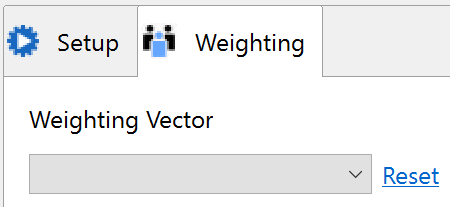
Simply select the weighting variable using the combo box in the weighting tab that appears when you run the algorithm in SmartPLS. After selecting a weighting variable, SmartPLS automatically applies WPLS, and all subsequent PLS computations draw on these sampling weights, giving you weighted PLS results.
If the weighting tab is not available for an algorithm in SmartPLS, WPLS is not (yet) available for that algorithm.
Example Data Sources with Sampling Weights
- International Social Survey Programme (ISSP)
- European Social Survey (ESS)
- European Working Conditions Survey (ECWS)
- European Company Survey (ECS)
- European Quality of Life Surveys (EQLS)
Frequently Asked Questions
What problem does the weighted PLS algorithm (WPLS) solve?
WPLS corrects for imperfections in a sample — such as unequal selection probabilities, unit nonresponse, or noncoverage — so that PLS-SEM results better represent the population the sample was drawn from.
When should I use WPLS instead of the standard PLS-SEM algorithm?
Use WPLS when your sample may not represent the population equally across all population members and you have an appropriate sampling (post-stratification) weight variable available. WPLS then provides, on average, more accurate population parameter estimates than the standard algorithm.
What do I need to run WPLS in SmartPLS?
You need a weighting variable in your data set that contains the sampling weight for each observation. This variable must be created before importing the data into SmartPLS.
How do I activate WPLS in SmartPLS?
Select the weighting variable from the combo box in the weighting tab that appears when running the PLS, PLSc, or another supported algorithm. SmartPLS then automatically applies WPLS to all subsequent computations.
Which algorithms support WPLS in SmartPLS?
WPLS is available for the PLS and PLSc algorithms, as well as any other algorithm in SmartPLS that is based on their results. If the weighting tab does not appear for a given algorithm, WPLS is not yet available for it.
Where can I find example data sets that include sampling weights?
Several large-scale survey programs publish data with sampling weights, including the International Social Survey Programme (ISSP), the European Social Survey (ESS), the European Working Conditions Survey (ECWS), the European Company Survey (ECS), and the European Quality of Life Surveys (EQLS).
Related SmartPLS Methods
References
- Becker, J.-M., & Ismail, I. R. (2016). Accounting for sampling weights in PLS path modeling: Simulations and empirical examples. European Management Journal, 34(6), 606–617.
- Cheah, J.-H., Roldán, J. L., Ciavolino, E., Ting, H., & Ramayah, T. (2021). Sampling weight adjustments in partial least squares structural equation modeling: Guidelines and illustrations. Total Quality Management & Business Excellence, 32(13–14), 1594–1613.
- More literature ...
Cite correctly
Please always cite the use of SmartPLS!
Ringle, Christian M., Wende, Sven, & Becker, Jan-Michael. (2024). SmartPLS 4. Bönningstedt: SmartPLS. Retrieved from https://www.smartpls.com
